Long-Distance Relationships: How AI Image Generators Help Couples Say “I Miss You”
Long-distance relationships run on small gestures. A good-morning text across time zones, a voice note before bed, a photo of the coffee you wish you were sharing. When you can’t be in the same room, every message carries a little more weight. But after months of the same texts and selfies, many couples start looking for new ways to say what they feel. AI image generation has quietly become one of them, turning shared memories, inside jokes and future plans into pictures you can send across any distance.
Why “I Miss You” Gets Harder to Say Over Time
The first weeks apart are full of long calls and heartfelt messages. Over time, though, routine sets in. “Miss you” becomes a reflex at the end of a message rather than a feeling that lands. That doesn’t mean the feeling has faded; it just means the words have worn smooth from use.
Visuals cut through that. A picture of the two of you sharing a meal on the balcony you dream about, or a playful illustration of your partner’s cat waiting by the door for you, says “I’m thinking about you” in a way a three-word text can’t. It shows effort, imagination and attention to the little details that matter in your relationship.
Why Couples Turn to Images, Not Just Words
Words describe a feeling. Images let your partner see it. That’s especially powerful in a long-distance relationship, where so much of your connection lives in imagination: the trip you’re planning, the home you’ll share one day, the moment you’ll finally be in the same airport arrivals hall.
The problem has always been that creating custom images took skill. Unless you could draw or design, you were limited to photos you already had, stock e-cards or generic stickers. AI has removed that barrier.
How an AI Image Generator Turns a Feeling Into a Picture
With the AI Image Generator on Animx, you describe the scene you have in mind and get a finished image in seconds. Animx brings several leading models into one workspace, including Google’s Nano Banana Pro, Black Forest Labs’ Flux 2 Max, ByteDance’s Seedream and GPT Image. Each one has a slightly different style, so you can run the same idea through several models, compare them side by side and choose the version that feels most like the two of you.
Here are a few ideas for “missing you” images:
- The future reunion: “A young couple running toward each other in a busy airport arrivals hall, warm golden light, joyful and emotional, cinematic photography style.”
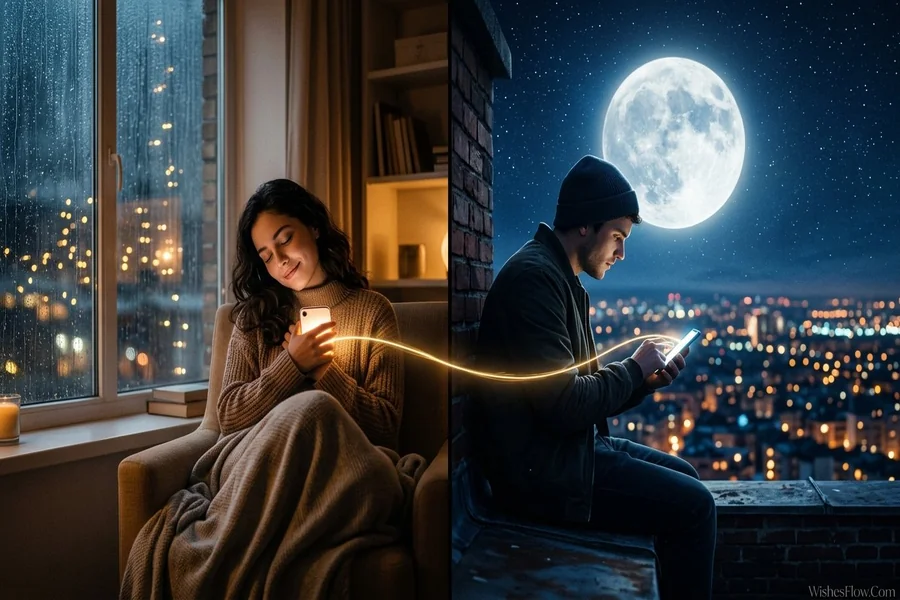
- Two cities, one moon: “Split image of two city skylines at night, Tokyo on the left and London on the right, connected by the same glowing full moon, dreamy and romantic.”
- The dream home: “A cozy balcony at sunset with two coffee cups, a blanket and string lights, view over a quiet seaside town, warm and peaceful.”
- Inside jokes: “A cartoon penguin wearing a tiny backpack waving goodbye at a train station, cute flat illustration, pastel colors.”
- Countdown cards: “Illustrated calendar with hearts on the remaining days, a small paper airplane flying toward a red circle, soft watercolor style.”
You can generate in different formats depending on where you’ll send it: square for a chat message, 9:16 for a phone wallpaper or story, 16:9 for a laptop background.
Using Your Own Photos and Memories
Some of the most meaningful images start from real photos. Animx lets you upload a picture and edit it while keeping the original composition: change the background, adjust the lighting, remove distractions or place the photo in a new setting. A selfie from your last visit can be placed under the Paris sky you’ve been planning to see together. An old photo of your first date can get a soft, cinematic glow. Seedream accepts up to 10 reference images at once, which helps keep faces and styles consistent if you want to create a series, such as a monthly “us” illustration in the same art style.
A note of respect: only use photos of your partner in ways they’d be happy with, and keep personal images private if that’s what they prefer. The goal is to bring you closer, not to surprise them with something that makes them uncomfortable.
From Still Image to “Missing You” Video Message
Sometimes a still image isn’t quite enough. On Animx, any image can be turned into a short video by clicking Animate, which sends it to the video workspace as the starting frame. Models like Seedance, Veo, Kling and Sora can add gentle motion: snow falling outside the window of your future home, the moon slowly rising between two cities, or the two of you turning to smile at each other. Some models also generate sound with the picture, so a quiet café scene can arrive with soft background ambience. It’s a simple way to turn a picture into a small, heartfelt video message.
Creative Ways Long-Distance Couples Use AI Images
- Good-morning and good-night cards personalized for their time zone
- Anniversary illustrations marking how long you’ve been together
- Visit countdowns with a new image for each week before you meet
- “Our future” mood boards of the places you want to live or travel together
- Custom phone wallpapers that match on both of your phones
- Shared story pages where each of you adds a new illustrated “chapter” every month
What to Keep in Mind
AI images are a supplement to your connection, not a replacement for it. They work best alongside real conversations, honest check-ins and regular calls. Use them to add warmth and creativity, not to fill silence.
It’s also worth keeping the images authentic. A picture of the future you imagine together is lovely; a picture that pretends something happened when it didn’t can create confusion. Most couples find the best images are the ones rooted in real memories, real plans and real jokes.
What to Look For in an AI Image Tool
- A free way to start: Animx gives new accounts free credits with no card required, enough to create several images.
- Multiple styles: different models give you photoreal, illustrated or dreamy looks.
- Photo editing: being able to start from your own pictures makes images personal.
- Easy to use: plain-language descriptions should be all you need.
- Formats for every screen: square, vertical and widescreen options.
Frequently Asked Questions
Can I use photos of my partner and me?
Yes. You can upload your own photos and edit them, for example by changing the background or lighting. Just make sure your partner is comfortable with how their image is used.
Do I need design skills?
No. You describe the image you want in plain language, and the AI creates it. Comparing a few models helps you find the style you like best.
Can I turn an image into a video message?
Yes. Click Animate on any image to create a short clip with gentle motion, and some models can add sound as well.
Is it free?
You can start for free. New Animx accounts receive free credits on sign-up with no card required.
What makes a good “missing you” image?
Specific details. Your favorite café, an inside joke, the city you’re dreaming of, the time on both your clocks. The more personal the description, the more meaningful the image will feel.
Conclusion
Distance makes the simplest words harder to say in fresh ways. AI images give long-distance couples a new language for “I miss you,” one made of shared memories, inside jokes and pictures of the future you’re building together. With several leading image models, photo editing and a one-click path to video in one place, Animx makes it easy to create something personal in minutes. It won’t replace the moment you finally meet at arrivals, but it can make the wait feel a little shorter.