
How USB-C to HDMI and USB-C Docking Stations Make Everyday Work Easier
It seems like these days laptops and tablets become thinner and lighter more regularly, but it is not rare that the number of ports has decreased as well. This can be a big issue if one wants to connect an external monitor, transfer files and charge a device at the same time. The good part is with only a few practical peripherals you can be on your way to getting all that done with little hassle. An USB C female to HDMI male dongle and a USB C docking station are two very handy tools that allow people to add as many ports to the devices as they need.
It is most beneficial to go with an USB C to HDMI cable or adapter for one to show contents from a phone, computer or tablet on a TV or monitor screen. On the other hand, an USB C docking station offers several connections through just one USB-C port if the user can hook up their device to it. Depending on situations, such as working at your home computer, or preparing presentations and arranging an office desk in a more convenient way, these accessories may vary as to which will suit better.
What is USB-C all about?
The small form factor of the USB-C plug not only makes handling devices easier but also that one can connect it in whichever way it goes so you don’t have to worry of which side is right. Depending on what the device supports and its features, the USB-C connection is able to charge the device, transfer data, provide the user with a external display and enable the user to connect to other peripheral devices.
But still, even though they are all USB-C, they are not the same ports. Some will only allow charging and file transferring and other types could do that plus the video signal and high-speed internet. When a customer is looking for a display peripheral it is this distinction that is very important. Before getting oneself an USB C to HDMI or a USB-C docking station one should first find out the technical specs of their laptop or tablet. Getting to know the compatibility beforehand can spare one the hassle of failed connections and that the accessory will be able to perform the features one would normally use.
Why an External Display Can Help Raise Productivity
Getting the job done on a small laptop screen while keeping several applications open is a source of eyestrain. That is when a second display can be a great relief. An externel screen allows opening multiple documents and web pages, switching between tasks without the burden of minimizing and maximizing windows, and even having separate web browsers. This can help users save time and make the entire office work more efficient. For writers, an extra screen is a place to have a reference on one side and a manuscript on the other, while a designer could display large canvases on screen at full scale. A student may also take advantage of a second screen for online classes and reading materials. The level of improvement will depend on how one works but even a single extra screen will surely increase work comfort and organization.
Choosing the Right USB-C to HDMI Cable
The quality of display cables varies. Some display Full HD, others may even reach UHD resolution. The ability of a cable also determines, aside from resolution, how fast, smooth, or flickery screen images are. Cables USB C to HDMI are available in several types, and choosing one depends on the monitor’s resolution to use, your refresh-rate requirement, your computer hardware, and whether your entire setup works on a type of HDMI standard. Whereas a cable certified to deliver 4K at 60 Hz is probably going to be the most useful if it is for a modern office display, a model that is only 4K at 30 Hz is quite limited. People should also think about the length of the wire and robustness of the connector. Shorter cables may be more suited for a working station while the longer ones can be useful when the screen is further apart.
In addition to price and appearance, it is better to check out all technical details of cables, such as maximum resolution and refresh rate to make the right choice.
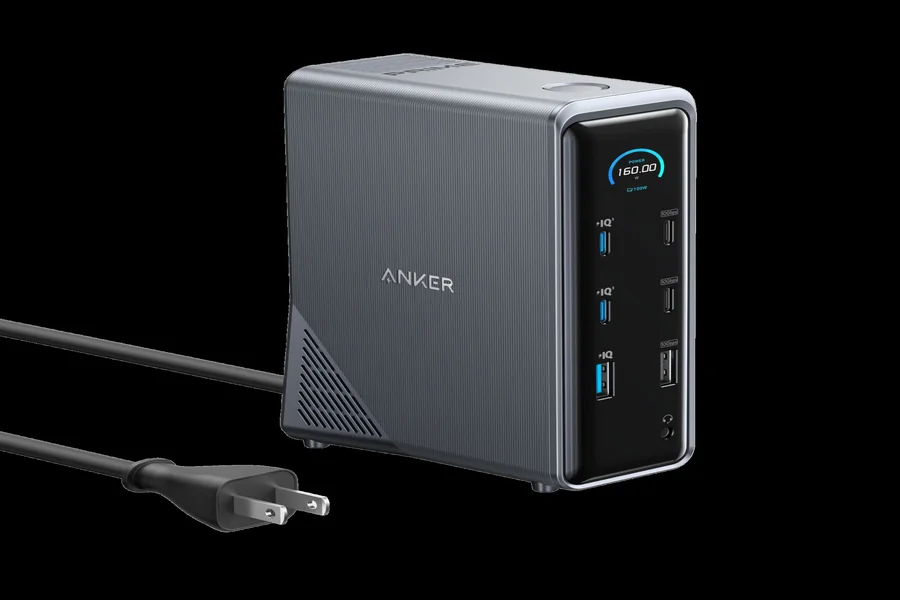
What Is a USB-C Docking Station?
Depending on the version, these could be HDMI, USB-A, USB-C, Ethernet, SD card reader, and power input ports. Usb-C docking stations come quite handy when you work with multiple devices on a daily basis. Like, through a dock at once you would be able to connect all these accessories: a display, a keyboard, a pointer, a storage, and network with the wired connection.
You will save quite some time from repeatedly plugging and unplugging your devices this way. Still note that docks do differ quite a bit in the ports they have, and some also differ in terms of their performance. There are docking stations that let you run more than one external monitor at the same time. At the same time some only provide one connection for an external screen.
Conclusion
Currently, computers are mostly made to be lightweight yet have limited ports which often cause the problems of day-to-day plugging up. Display cables together with docking stations are the solutions to connect external screens, televisions, storage devices, or any other gadget quite easily and quickly. Well-chosen products can definitely be a help and make one’s workspace or entertainment time more comfortable and enjoyable.
For situations where video and audio signals are to be transferred together to a compatible display, HDMI connection from USB C is definitely a very suitable choice. On the other hand, USB C docking station may be preferred when several accessories are to be kept connected all day long. Choosing either solution without first checking what the source device and attached gadget are capable of is a sure way to disappointment. If the correct pair is selected, users will benefit from not only a good-looking workspace but also more convenience and support for the daily activities.
FAQ
Q1: Which role plays a USB-C to HDMI cable?
Such a cable is mainly used for connecting an appropriate USB-C device to a monitor or another HDMI display that it is projecting to (i.e. television projector). Via a single connection one can transmit video and, if possible, audio as well.
Q2: Is it possible to get HDMI output from all USB-C ports?
It is only possible when the device port has the capability to handle the required video output. These days such capability is most commonly achieved by means ofDisplayPort Alt Mode that can be a source of HDMI output. Otherwise, some other standard for display could help. Before buying a cable, it is a very good idea to check if the device has these capabilities.
Q3: What can a USB-C docking station do?
In a way, it is a computer port expander which offers more than one plug port. Usually, it may support an external screen connected, different kinds of USB accessories connected, Ethernet, memory stick, and at the same time a laptop’s charger is provided through it. That makes a multifunctional dock quite useful.


One Comment